


Melicum
Control HDMI and DisplayPort audio on macOS with your usual volume keys.
- Platform
- macOS 14.2 or later
- Built with
- SwiftUICore AudioSwiftC / DSP
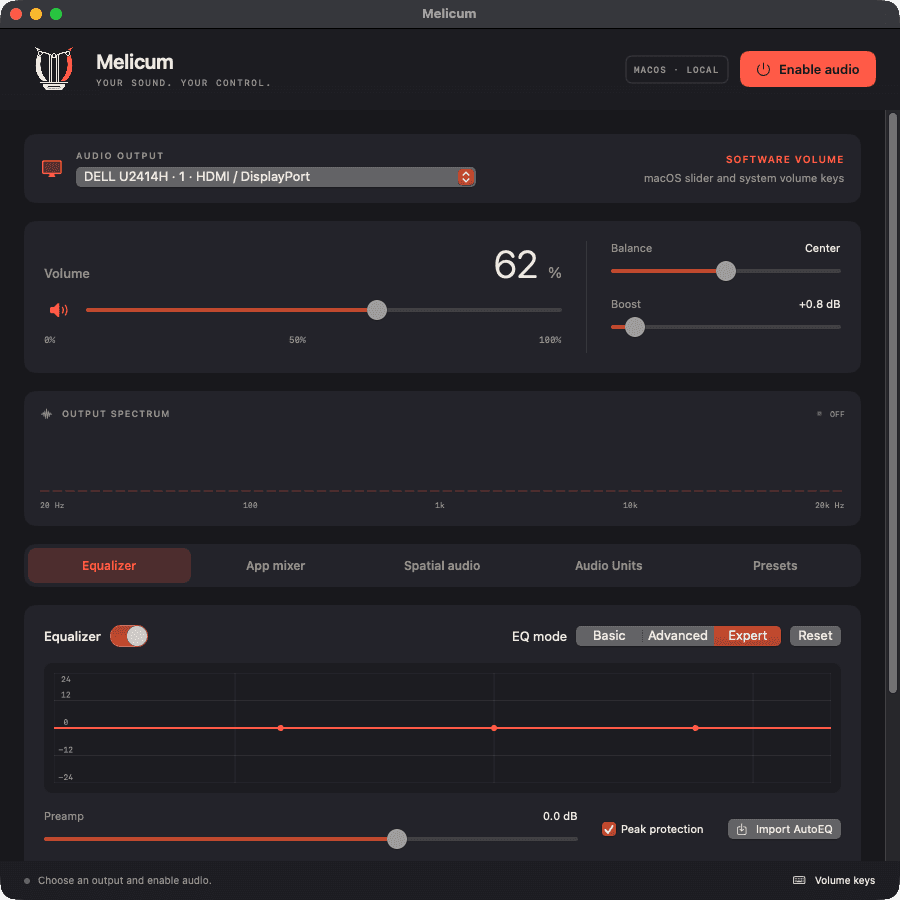
Melicum lets you control the volume of HDMI and DisplayPort audio outputs on macOS, even when the device has no hardware volume control. It adjusts the audio level in software.
An optional component connects Melicum to the macOS volume slider and keyboard controls, keeping volume and mute settings in sync.
For more control over your sound, it includes equalizers with three levels of detail, a spectrum analyser, a per-app mixer, spatial audio, Audio Unit chains, AutoEQ import and settings presets.
Built with SwiftUI, Core Audio and a DSP engine in C. Audio is processed locally, without recording it or sending it over the network.
In practice
For using HDMI or DisplayPort monitors as audio outputs, controlling volume from the keyboard and adjusting the sound of individual applications.
- Control volume, mute and balance even when the digital output has no hardware volume control.
- Adjust applications independently with the mixer and save settings recalled by output or app.
- Choose basic, advanced or expert EQ, add Audio Unit effects and import local AutoEQ presets.
- Process mono or stereo PCM audio locally; the component for native macOS volume keys is optional.
Screenshots and demos
Open an image to explore the details. Videos play only when you start them.
GitHub statistics
- Open issues
- 0 (opens in a new tab)
- Downloads
- 120 (opens in a new tab)